
Cutting list and cutting plan, straight from the 3D model
Build the cabinet in 3D and Easy Form Studio makes the cutting list with cut sizes and edge tape, the cutting plan with usable offcuts and labels with QR codes. Change a size and everything updates, with nothing retyped.
What the cutting list contains
The Excel cutting list has a row for every board in the project. Length always runs along the grain and identical parts are not merged, so the row number matches the label and the cutting plan.
- Material and thickness, cut size and finished size
- Edge tape per edge (0.4 / 0.8 / 1 / 2 mm), also in a decor other than the board’s
- Hinges, notes and a CNC mark for boards that are not rectangular
- Bill of materials: m² and edge tape metres per decor and thickness
- Nesting and hardware on their own sheets
| No. | Material | Thk. | Length | Width | Tape L1 / S1 / L2 / S2 | Part | Cabinet |
|---|---|---|---|---|---|---|---|
| 1 | W1000 ST9 Premium White | 18 | 720 | 562 | 0.4 / 0.4 / 0.4 / 0.4 | Left side 1 | Corner element |
| 2 | W1000 ST9 Premium White | 18 | 1164 | 720 | 0.4 / 0.4 / 0.4 / 0.4 | Left side 2 | Corner element |
| 3 | W1000 ST9 Premium White | 18 | 720 | 544 | 0.4 / 0.4 / 0.4 / 0.4 | Right side 1 | Corner element |
| 4 | W1000 ST9 Premium White | 18 | 1182 | 720 | 0.4 / 0.4 / 0.4 / 0.4 | Right side 2 | Corner element |
| 5 | W1000 ST9 Premium White | 18 | 1164 | 1146 | 0.4 / 0.4 / 0.4 / 0.4 | Corner top | Corner element |
| 6 | W1000 ST9 Premium White | 18 | 1164 | 1146 | 0.4 / 0.4 / 0.4 / 0.4 | Corner bottom | Corner element |
| 7 | W1000 ST9 Premium White | 18 | 1164 | 1146 | 0.4 / 0.4 / 0.4 / 0.4 | Corner shelf 1 | Corner element |
| 8 | U702 ST9 Cashmere Grey | 18 | 718 | 556 | 2 / 2 / 2 / 2 | Front left | Corner element |
| 9 | U702 ST9 Cashmere Grey | 18 | 718 | 556 | 2 / 2 / 2 / 2 | Front right | Corner element |
Excerpt of the demo kitchen cutting list (the first 9 of 100 rows).
Cutting plan with offcuts
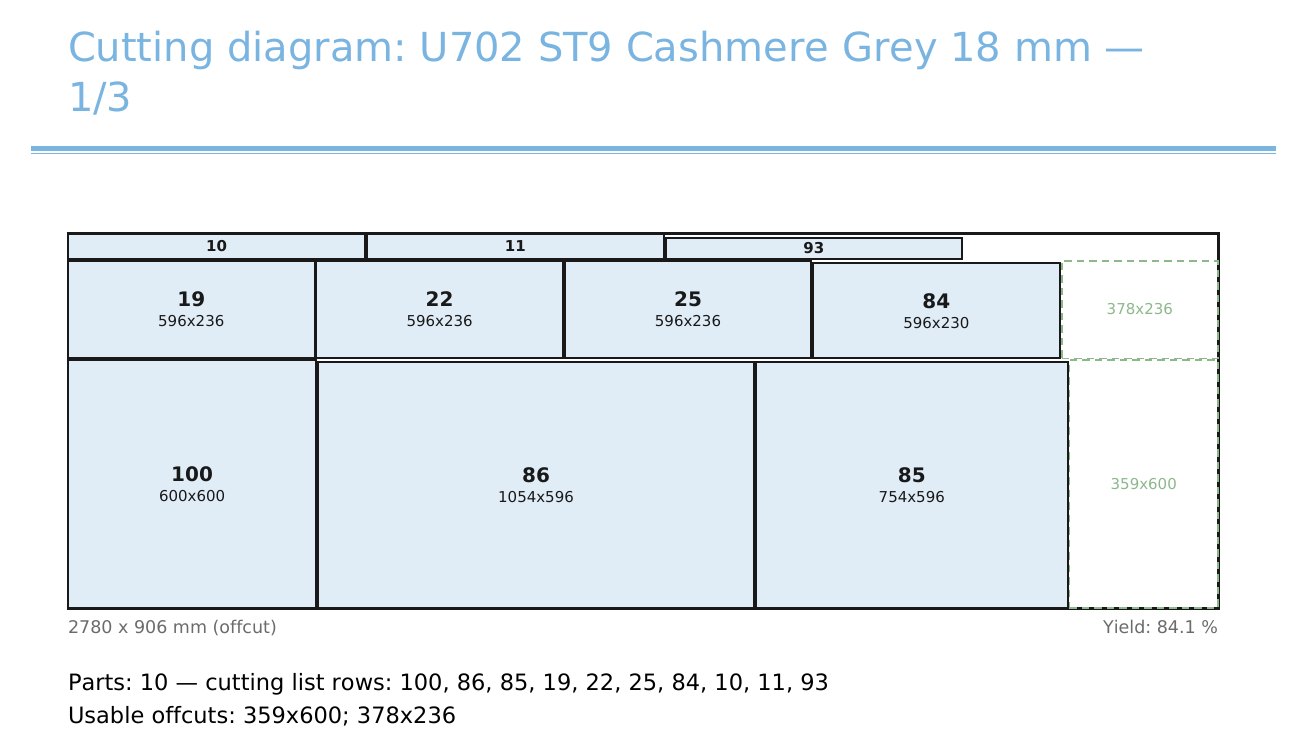
The program lays the parts out on sheets with edge-to-edge cuts, the way a panel saw cuts, grouped by decor and thickness. It tries six layouts and keeps the one with the fewest unplaced parts, then the fewest sheets.
Usable offcuts (at least 200 × 100 mm) are marked green and saved to the price list, so the next project uses them free. Parts with grain are never rotated.
- Default sheet 2800 × 2070 mm with a 10 mm trim; sizes, prices and stock from the price list
- Saw kerf 4.4 mm by default, adjustable
- Yield in percent for every sheet
- A CSV with the cut sequence for the saw
Cut sizes without arithmetic
If your edge bander pre-mills, the cut size equals the finished size. If it doesn’t, the program takes the edge tape on the opposite edges off the finished size. Doubled boards are handled too: a thicker part is made of two boards with an oversize, one row with a note in the cutting list and two rows in the list for other software.
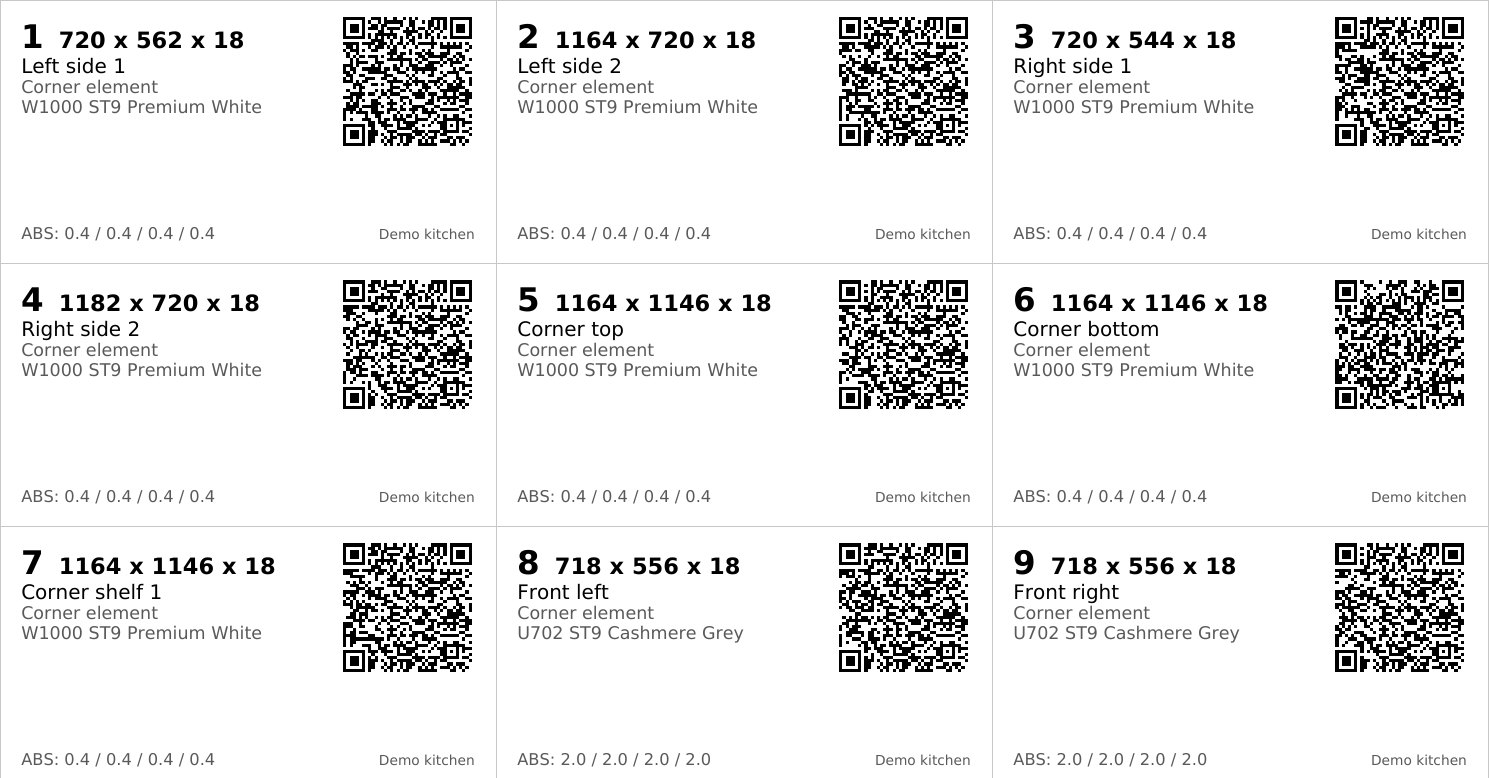
- A label with the part number, size, decor and edge tape
- The QR code on the label opens that part in 3D on a phone
- Assembly instructions per cabinet, with the same numbers
Download what the program exports from the demo kitchen
The files were exported from the demo kitchen you can open in 3D, with no changes by hand.
Questions
Can I send the cutting list to a board supplier?
Yes. The program exports it for other software too, e.g. Mareta (WinTable), and builds the order of boards and tape itself. See Board suppliers and cutting orders.
Do I have to use Excel?
No. The cutting list goes to Excel or to a PDF with board drawings, and for other software to CSV or Excel in a layout you set up.
Does it work with my sheet sizes?
Yes. Sheet sizes, prices and stock are in the price list (the Sheets worksheet), and offcuts from earlier projects are added automatically.
I don't have the program. Is there a template?
There is a free cutting list Excel template that works out cut sizes, m² and tape metres.
Start your own project
€19 a month, €149 a year or a lifetime licence for €499 once. With the monthly or the yearly plan, EFS Web in the browser is free for the first 14 days; the Windows and Mac app and the Blender add-on unlock with the first payment.