
DXF, MPR and CIX for CNC, from the same 3D model
For every board the program exports a DXF with the outline, cut-outs, holes and grooves on layers, and optionally a program for Homag woodWOP (MPR) or Biesse (CIX). The holes come from the hardware and joints you chose.
The CNC export (DXF, MPR and CIX) is in beta and needs a detailed check before production. Check every file in your CAM program: the origin, the X axis direction (along the grain), hole diameters and depths, edge drillings and grooves. Run the first program on a test board and compare it with the board’s PDF drawing. MPR and CIX are marked as a preview version in the program too.
What the DXF contains
One DXF per board, R12 ASCII, in millimetres and at the cut size. The origin is bottom left and the X axis runs along the grain. A board machined on its other face gets a _B file too, and index.csv links the files to the cutting list.
| Layer | ACI | Contents |
|---|---|---|
| CONTOUR | 7 | board outline |
| CUTOUT | 2 | cut-outs |
| DRILL_D<Ø>_P<depth> | 1 | face holes, e.g. DRILL_D35_P13 |
| DRILL_D<Ø>_THRU | 1 | through holes, e.g. DRILL_D5_THRU |
| EDGE_LEFT/RIGHT/BOTTOM/TOP_D<Ø>_P<…> | 4 | edge drillings |
| POCKET_P<…> | 6 | grooves and rebates (e.g. for the back) |
| INFO | 8 | text for CAM |
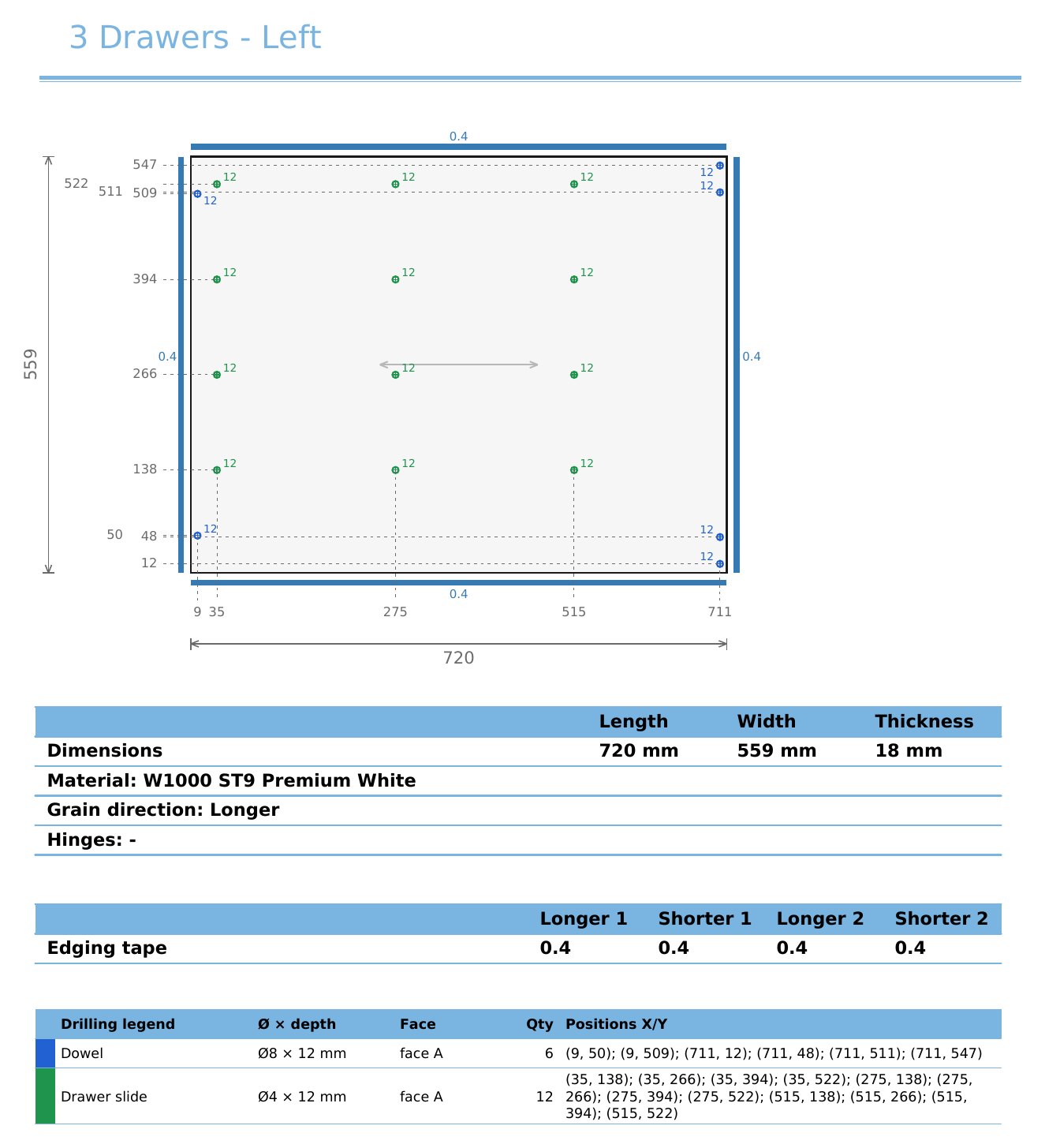
The holes draw themselves
The drillings come from the cabinet’s hardware and joints, so you don’t draw them. Change a runner or a joint and the holes move in every file.
- Dowel Ø8, confirmat Ø7 through and Ø5, minifix
- Hinge cup Ø35 × 13 mm, 21.5 mm from the edge
- System 32 shelf pins Ø5 × 12, runners Ø4 × 12
- Worktop joint Ø35 × 20; back grooves and rebates as pockets
MPR for Homag, CIX for Biesse
MPR (woodWOP, VERSION 4.0) holds drillings and rectangular pockets, without the outline. CIX (Biesse, CID3) holds drillings. Both are switched on in the CNC file settings and come out next to the board’s DXF.
For other machines use the DXF: assign the layers to operations in your CAM program.
Checklist before the machine
From the manual (chapter C04). Go through it for every new project until you have checked the files on your own machine.
- The fronts are visible (the Show fronts button is blue).
- Hinge type, slide type and joints type are from the catalogue, not “No drilling”.
- Project check shows no errors (overlaps, holes through a board).
- The holes have been checked in the see-through view on at least one cabinet of each kind.
- The export goes into an empty folder.
- In CAM the layers are assigned to operations, and the first board has been checked against the PDF drawing, allowing for the edge tape.
- The MPR or CIX has been run for the first time on a test board.
- Boards with a _B file are marked for a second pass (the machine drills face B after turning the board over).
Download the demo kitchen's CNC files
Exported from the demo kitchen with no changes by hand. Open them in your CAM program and compare them with the PDF drawings.
The CNC export (DXF, MPR and CIX) is in beta and needs a detailed check before production. Check every file in your CAM program: the origin, the X axis direction (along the grain), hole diameters and depths, edge drillings and grooves. Run the first program on a test board and compare it with the board’s PDF drawing. MPR and CIX are marked as a preview version in the program too.
Board drawings (PDF)
To compare with CAM: dimensions, holes and a drilling legend for every board.
DownloadQuestions
Which machines does it support?
Any CAM program reads DXF. MPR is for Homag (woodWOP), CIX for Biesse. For other machines assign the DXF layers to operations in CAM.
Why is the export marked beta?
The files are checked against the drawings and in CAM, but not on every machine and set-up. So always run the first program on a test board and check the depths, diameters and origin.
Does the DXF store the height of an edge hole?
No. Edge holes are drilled at mid-thickness, and the layer carries the diameter and depth.
Do I need a special plan for the CNC export?
No. Every export works with the yearly subscription and with the lifetime licence.
Start your own project
€19 a month, €149 a year or a lifetime licence for €499 once. With the monthly or the yearly plan, EFS Web in the browser is free for the first 14 days; the Windows and Mac app and the Blender add-on unlock with the first payment.